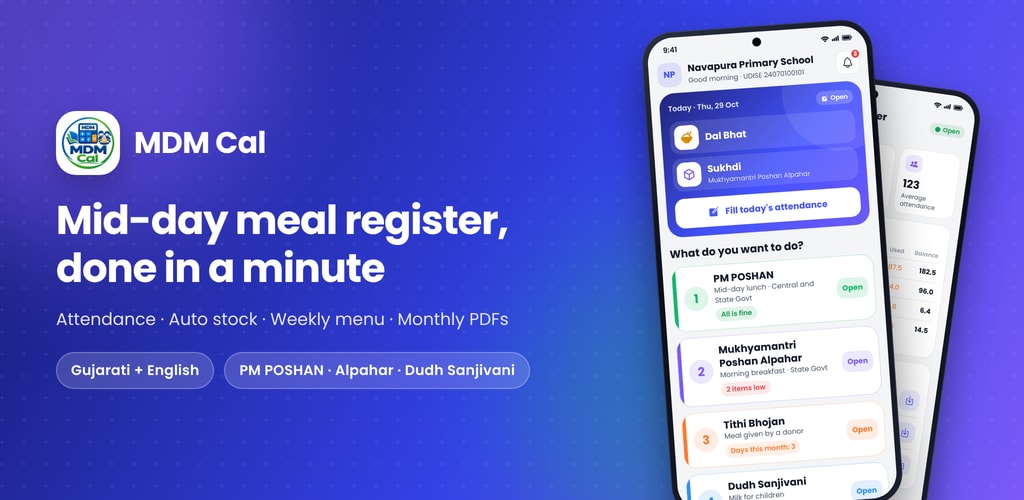
MDM Cal is a mid-day meal register and stock management app for government primary schools in Gujarat, designed and developed by RelieveX Labs for its client Digital Services and published on Google Play by RelieveX Labs. The MDM in-charge types how many students came and ate today, and the app keeps the stock for PM POSHAN, Mukhyamantri Poshan Alpahar and Dudh Sanjivani, the monthly register and the government report formats up to date on its own.
Before MDM Cal, centres kept all of this in paper registers and on calculators: caste-wise attendance, scheme stock, monthly quotas, vouchers and month-end forms that had to be written again and again. MDM Cal turns that work into one Gujarati-first Android app with a backend and a form engine that prints straight into the formats schools already submit.
Product: Mid-day meal (MDM / PM POSHAN) register, stock and report app for schools
Platforms: Android app on Google Play, with backend and admin tools; iOS planned
Built for: Government primary schools and MDM centres in Gujarat (Std 1-8)
Used by: Principals, MDM in-charge teachers and the admins who support schools
Languages: Gujarati and English
Client: Digital Services
Published on Google Play by: RelieveX Labs
Developed by: RelieveX Labs, Himatnagar, Gujarat, India
Why mid-day meal centres need a dedicated app
A school mid-day meal centre runs on numbers. Every day the MDM in-charge records how many students came and how many ate, split by caste and by boys and girls, for Std 1-5 and Std 6-8 separately. From those numbers the centre must work out how much of every item was used, keep a running stock account for each scheme, add the monthly quota that comes from the godown, and pay for vegetables, spices, grinding and fuel from the centre advance.
At month end the same figures are copied into printed government formats: the grain register, voucher index, certificates and the centre information sheet. Done by hand, this takes hours, one wrong total breaks the whole month, and a missed day leaves gaps that are hard to fill later. Our client, Digital Services, works closely with these schools and asked RelieveX Labs for an app that removes the repeated writing and keeps every figure right from the first entry.
How MDM Cal works, from today's meal to the month-end forms
Set up once. The school registers with its UDISE code, address and student count by caste and boys / girls. The admin assigns schemes, dishes, recipes and the weekly menu.
Add opening stock. The school enters the ration it has today. From then on, every change is calculated.
Fill today's attendance. Today's dish comes from the menu. The teacher enters who came and who ate, and the app adds the totals.
Stock moves by itself. The right quantity of each item leaves the right scheme's stock, and the remaining days are shown on the home screen.
Record money and vouchers. Advance received, vegetables, spices, grinding, fuel and honorarium are entered as vouchers that print in the government layout.
Close the month. The register is checked, pending days are closed, the month is locked, and the government forms are downloaded as ready PDFs.
Mid-day meal management features in detail
Caste-wise attendance for Std 1-5 and Std 6-8
The daily form follows the government register. Students who came and students who ate are entered by caste and by boys and girls for each standard group, with buttons for "everyone came" and "all of them ate" on normal days. Totals are checked against the school's roll, and new admissions or students leaving are recorded with a start date, so older days and months keep the numbers they had.
Scheme-wise stock: PM POSHAN, Alpahar and Dudh Sanjivani
Each meal programme has its own stock. Lunch under PM POSHAN, morning breakfast under Mukhyamantri Poshan Alpahar and milk under Dudh Sanjivani are tracked separately, item by item. Stock received, the monthly scheme quota, loss or wastage and corrections are all recorded, and a wrong entry can be cancelled with the stock put back automatically.
Monthly allocation from student count and scheme rate
Admins set up each scheme with its items, rates per student and credit day. On that day the month's quota is added to every eligible school's stock. Allocations can follow the menu, counting rice only on rice days and wheat only on roti or dhokli days, and each allocation keeps a copy of the rate and student count, so later changes never rewrite history.
Weekly menu, recipes and Tithi Bhojan
Admins build dishes with recipes in per-student quantities for each standard group, or a fixed quantity per day, plus the money the scheme pays per student. Schools follow a common weekly menu or their own. On Tithi Bhojan days, when a donor provides the meal, attendance is recorded but no school stock is used; part-donor days use only the items the donor did not give.
Monthly register and month close
The monthly register shows meal days, total beneficiaries, average attendance, students who came and ate by caste and gender, scheme allocations and the stock account with opening, received, used and balance for every item. Closing the month fills any pending days and locks the month; only an admin can reopen it.
Government form engine for PDF, Word and Excel
This is the part that saves the most time. Admins upload a blank government form and MDM Cal fills it from the data already in the app.
PDF forms: ready layouts place every value on the Gujarat PM POSHAN formats, and a preview grid lets the admin fine-tune positions for scans of different sizes.
Word and Excel forms: values are written into the document's own cells and lines, and LibreOffice converts the result to PDF with Gujarati fonts.
Included layouts: vegetable, spice, grinding and fuel vouchers, voucher index for PFMS and IFMS, certificates and the centre web page sheet.
Money, vouchers and honorarium
Every bill paid from the centre advance becomes a voucher with its head, items, quantity, rate, payee and an automatic share between Std 1-5 and Std 6-8. Purchases can be added to stock in the same step. Advance received and honorarium paid are recorded beside them, and the month's balance is always visible.
Admin dashboard, schools and plans
Admins see today's position across all their schools: attendance filled or pending, meals served, schools with low stock and plans ending in the next 15 days, grouped by district. They add schools, change student counts, correct any day, send notices to all schools, manage holidays and report templates, and see a full activity log. A super admin creates admins and limits each one to the districts they look after.
Automatic daily and monthly work
Background jobs run on India time without manual steps: open days are closed at night, monthly allocations are credited, last month's register is closed on the set day, attendance reminders are sent, and ended plans are marked expired. Each job runs once, even after a server restart.
Privacy, security and Google Play readiness
Schools log in with their UDISE code and admins with a mobile number, both protected by hashed passwords and short-lived tokens. Payment gateway keys are stored encrypted with AES-256-GCM. The app stores only student counts, never student names. It ships with a privacy policy, account deletion inside the app and on the web, a clear not-a-government-app notice, and only the camera and notification permissions.
Who does what in MDM Cal
User | What they can do |
|---|
School (principal / MDM in-charge) | Daily attendance, stock in and out, menu, holidays, vouchers and money, monthly register, government form PDFs, plan renewal |
Admin | Schools in their districts, schemes, dishes and recipes, allocations, report templates, payments, notices, corrections and month reopening |
Super admin | Everything an admin can do, plus creating admins, payment gateway settings, legal pages and account deletion requests |
MDM Cal compared with paper registers
MDM task | Paper register and calculator | With MDM Cal |
|---|
Daily attendance totals | Added by hand for each caste and group | Added by the app as you type |
Stock used per day | Worked out from the recipe every day | Taken out of stock automatically |
Monthly scheme quota | Calculated and written in the register | Credited on the scheme's credit day |
Vouchers | Written on printed forms | Entered once, printed in the government layout |
Month-end forms | Copied again from the register | Ready PDFs from the same data |
Forgotten day | A gap in the register | Closed automatically at night, correctable later |
Technology behind MDM Cal
Layer | Technology | Why it matters |
|---|
Mobile app | React Native with Expo SDK 54, EAS Build and EAS Update | One codebase, fast Android builds and over-the-air fixes |
Backend and API | Node.js, Express 5 and REST API with JWT | Role-based access for schools, admins and the super admin |
Database | MongoDB with Mongoose | Flexible records for days, stock, schemes, vouchers and months |
Form engine | pdf-lib, PDFKit and headless LibreOffice | Fills PDF, Word and Excel government forms and outputs PDF |
Language | Gujarati and English, Noto Sans Gujarati | Every screen and printed form reads correctly in Gujarati |
Payments | Razorpay, PhonePe and Cashfree | Online plan payments with server-side verification and receipts |
Pictures | Cloudinary | Small, compressed photos of items, dishes and meals |
Results for schools and admins
Daily attendance takes about a minute instead of a register page and a calculator.
Scheme stock stays correct without manual calculation, with warnings before items run out.
Month-end government forms come out as ready PDFs instead of being copied again.
No more gaps from missed days, and a full history of every correction.
Admins see which centres are up to date, district by district, from one dashboard.
Gujarati-first screens make the app usable by every MDM in-charge.
MDM Cal is available for Android on Google Play. MDM Cal is an independent app and is not affiliated with or endorsed by any government; scheme information comes from the official PM POSHAN website.
Build your school or government-scheme app with RelieveX Labs
RelieveX Labs is a software development company in Himatnagar, Gujarat that builds mobile apps, school management software, SaaS platforms and form-automation tools for clients across India. MDM Cal shows how we work: we study the real register first, then design the app around the people who fill it every day. See also our Krishna School of Education school ERP and mobile app and the LKPS school management app.
Need an app that keeps records for a government scheme or fills your printed forms automatically? Talk to our team about your project.